Introduction
Traditional access credentials fail in predictable ways. According to ASIS 2023-24 research, 61% of security professionals reported tailgating or piggybacking at their facilities in the prior six months, 38% reported credential sharing, and 50% reported propped doors. Only 8% reported none of these failures.
These aren't edge cases. They're the predictable outcome of building security around things people carry — credentials that get lost, shared, or borrowed without anyone flagging it.
Biometric access control takes a different approach: instead of verifying what someone holds, it verifies who they are. That distinction closes the gap between "authorized credential" and "authorized person."
This guide covers how biometric access control works, the main technology types, the benefits and limitations, and what to evaluate when choosing a system.
TL;DR: Key Takeaways
- Biometric systems authenticate identity using unique physical traits — fingerprints, facial scans, iris, or palm veins — that can't be lost, shared, or stolen
- Verification typically completes in under 2 seconds, meeting NIST performance benchmarks
- Four main modalities exist: fingerprint, facial recognition, iris/retinal scanning, and palm vein — each suited to different environments and threat levels
- Key benefits: eliminates buddy punching, strengthens audit trails, and cuts credential management costs
- Privacy compliance (Illinois BIPA, Texas, Washington) is a hard legal requirement before any deployment
What Is Biometric Access Control & How Does It Work?
Biometric access control grants or denies physical entry by verifying a person's unique biological characteristics against a stored template — not a card, PIN, or password. The system confirms identity, not just possession of a credential.
The Enrollment Process
When a user enrolls, the biometric scanner captures their physical trait. That raw scan is converted into an encrypted mathematical template (a numerical representation of the biometric pattern, not a stored image) and linked to their identity record in the system database.
For palm vein scanning specifically, ePortID's Fujitsu F-Pro scanner captures the vein pattern beneath the skin using near-infrared light (roughly the strength of a TV remote). Enrollment takes approximately 15 seconds per hand, and the system analyzes around 5 million unique reference points to generate the encrypted template.
Existing employee records can be imported via CSV or Excel, with the palm vein template attached to each record.
The Verification Step
At the door, the reader captures a live scan and the matching engine compares it against the stored template. A match signal is sent to the door controller (in ePortID's case, via Wiegand or OSDP protocol to the Door Control Unit (DCU), which activates a 12V relay to release an electric strike or mag-lock). The entire process takes under 2 seconds.
Liveness Detection
Advanced systems verify that the biometric is from a live person in real time. ePortID's palm vein system uses near-infrared light to detect blood flowing through subsurface veins, which means photos, videos, silicone replicas, and synthetic prints cannot spoof the scan. Unlike 2D facial recognition or capacitive fingerprint sensors — which read surface characteristics — palm vein scanning requires a living, perfused hand to produce a valid result.
Single-Factor vs. Multi-Factor
That liveness requirement makes palm vein scanning a strong standalone credential — but it can also anchor a multi-factor authentication (MFA) stack. ePortID's ePortPass supports one, two, or three-part authentication: palm vein scan combined with RFID card and/or PIN for environments requiring layered protection.
What Are the 4 Types of Access Control in Security?
The four access control models are:
- Discretionary (DAC) — resource owners set permissions individually
- Mandatory (MAC) — a central authority enforces access based on classification levels
- Role-Based (RBAC) — permissions tied to job roles across the organization
- Attribute-Based (ABAC) — access determined by a combination of user, resource, and environmental attributes
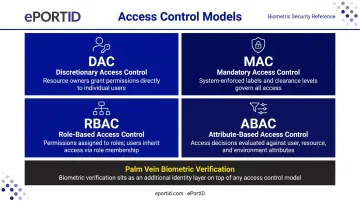
Biometric technology sits on top of whichever model an organization uses. It confirms who is at the door; the access policy determines whether that person is authorized to enter.
Types of Biometric Door Lock & Access Control Systems
Biometric systems are classified by the physical trait they measure and whether they require contact. Contactless systems are increasingly preferred in high-traffic and hygiene-sensitive environments — 43% of security professionals cited touchless capability as a top upgrade feature, according to HID/IFSEC research.
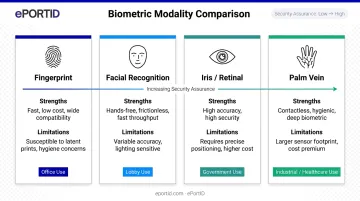
The four main modalities — fingerprint, facial, iris/retinal, and palm vein — each suit different environments, security levels, and operational conditions.
Fingerprint Recognition
The most widely deployed biometric modality. Fingerprint scanners map unique ridge endings and bifurcation points into an encrypted template.
- Strengths: Fast, familiar, low cost, mature technology
- Limitations: Accuracy drops with dirty, wet, worn, or dry fingers — NIST notes low humidity can produce dry fingers that are genuinely difficult to image
- Best for: Offices, standard commercial access points
NIST MINEX benchmarks set fingerprint false non-match rates at or below 0.01 at a false match rate of 0.01 — strong performance under controlled conditions, but real-world environments require fallback options.
Facial Recognition
Maps facial landmarks using 2D or 3D imaging and releases the door on a confirmed match.
- Strengths: Hands-free, fast in high-traffic lobbies
- Limitations: Performance degrades significantly with masks — NIST research found top algorithms failed roughly 5% of masked faces, with many algorithms failing 20–50% of the time. Lighting, camera angle, and PPE also affect accuracy.
- Best for: Main building entrances where masks and PPE are not a factor
Iris & Retinal Scanning
Iris scanning reads the unique pattern in the colored ring of the eye — fast, contactless, and scannable at short distance. Retinal scanning maps blood vessel patterns at the back of the eye and offers higher security, but requires close-proximity capture, making it less practical for general access points.
NIST IREX IX benchmarks place top iris algorithms at an FNMR of 0.0057 at FMR of 10⁻⁵. One practical note: single-eye matching raises the false non-match rate by up to 3.93x compared to two-eye capture — a meaningful consideration for high-throughput entry points.
- Best for: High-security government, banking, and critical infrastructure environments
Palm Vein Recognition
An infrared scanner maps the unique vein pattern beneath the skin — a subsurface, contactless biometric. The vein pattern cannot be altered by surface conditions, replicated externally, or spoofed, and the liveness check confirms blood is actively flowing.
ePortID's Fujitsu PalmSecure-based system derives identity from approximately 5 million unique reference points, with accuracy of 99.99991% and verification in under 1 second. The sensor is compact (35×35×27mm) and functions in the industrial conditions — heat, moisture, dust — where other modalities typically degrade.
Palm vein recognition is the strongest fit for ports, data centers, hospitals, military facilities, and food processing plants: any environment where hygiene, harsh operating conditions, or high security assurance are non-negotiable.
Key Benefits of Biometric Access Control for Organizations
Credential-Proof Security
Unlike keycards or PINs, a palm vein pattern can't be handed off, copied, or forgotten. ASIS data shows 38% of organizations experienced credential sharing in a six-month window — a problem that disappears when the credential is the person themselves.
Elimination of Buddy Punching
Biometric time-and-attendance systems create an indisputable record of who was physically present at clock-in and clock-out. A Nucleus Research study found biometric time terminals saved an average of 2.2% of gross payroll by eliminating buddy punching — the problem hasn't changed even if the study has aged. ePortID's PalmClock solution is specifically built around this use case and is designed to pay for itself within 3 to 6 months, depending on workforce size.
Audit Trails and Regulatory Compliance
Every access event generates a timestamped record tied to a verified identity. This matters across regulated industries:
- Healthcare: HIPAA (45 CFR 164.310) requires facility access controls for systems housing electronic PHI
- Critical infrastructure: NERC CIP-006-6 requires logging identity, date, and time of entry for individuals with authorized unescorted access
- Payment environments: PCI DSS Requirement 9 restricts physical access to cardholder data areas
ePortPass generates complete entry audit trails — tracking entry, exit, and duration — with real-time alerts for denied attempts and anomalous patterns.
Reduced Credential Management Overhead
No issuing, tracking, replacing, or deactivating keycards. With ePortID's system, enrollment takes roughly 15 seconds per hand and connects directly to existing employee records via CSV upload. Deactivation happens in the system — no card to collect. For a 200-person facility, that's hundreds of annual admin hours eliminated at the process level.
Contactless Throughput in High-Traffic Environments
Palm vein and facial recognition systems require no physical contact, which matters in healthcare, food processing, and factory environments where shared touch surfaces are a hygiene concern. ePortID's contactless technology also works with dirty, wet, or gloved hands — conditions that regularly defeat fingerprint scanners on factory floors.
Challenges & Limitations to Weigh Before Deploying
Privacy and Legal Compliance
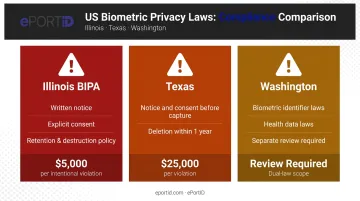
US biometric privacy laws treat enrolled templates as sensitive personal data with specific compliance requirements:
| State | Key Requirements | Maximum Penalty |
|---|---|---|
| Illinois (BIPA) | Written notice, explicit consent, defined retention/destruction policy | $5,000 per intentional violation |
| Texas | Notice and consent before capture; deletion within 1 year of purpose expiration | $25,000 per violation |
| Washington | Biometric identifier and health data laws require separate review | Varies |
BIPA litigation has produced substantial settlements — BNSF Railway agreed to $75M over fingerprint collection at an auto-gate system, and White Castle reached a $9.39M settlement over biometric timekeeping. Before enrollment begins, lock down consent procedures, retention schedules, and vendor data-processing terms — these aren't optional checkboxes, they're legal exposure points.
Real-World Accuracy Limitations
No biometric system is infallible. Plan for:
- Fingerprint: Degraded accuracy with dry, worn, or dirty fingers
- Facial recognition: Significant failure rates with masks, PPE, or poor lighting
- Iris: Performance linked to capture quality; motion blur and single-eye capture reduce accuracy
- Palm vein: Vendor-published accuracy figures, not independent NIST benchmarks — test in your environment
Every deployment should include a fallback authentication method — PIN entry, RFID card, or administrator override — particularly for environments where environmental factors (industrial dirt, PPE, extreme temperatures) are routine. ASIS consultants cited wrong technology or poor implementation in 34% of access-control failures.
Infrastructure and Integration Requirements
Those accuracy risks make upfront infrastructure planning critical. Key decisions before deployment:
- Network connectivity: ePortID's DCU runs on Power over Ethernet (802.3at+) up to 100 meters from a PoE source, with no licensed electrician required for installation
- Existing door hardware: Electric strikes and mag-locks typically stay in place — Wiegand and OSDP integration handles compatibility with most current configurations
- Database architecture: Whether you store templates on-premises or in the cloud affects uptime planning, data security obligations, and compliance documentation — decide this before procurement
- Platform integration: ePortID supports Wiegand and OSDP protocols across most existing access control platforms, with CSV/Excel import available for HR record synchronization
How to Choose and Implement the Right Biometric Access System
Selection Criteria
Match the modality to the environment and security requirements:
| Environment | Recommended Modality | Reason |
|---|---|---|
| Standard office | Fingerprint | Cost-effective, mature |
| High-traffic lobby | Facial recognition | Hands-free throughput |
| Critical infrastructure | Palm vein or iris | High assurance, spoofing resistance |
| Industrial/healthcare | Palm vein | Contactless, works with PPE or dirty hands |
Once you've matched modality to environment, evaluate these system-level factors:
- False acceptance rate (FAR) and false rejection rate (FRR) — ask for benchmarks specific to your environment
- Integration compatibility with existing access control platforms, HR software, and video surveillance
- Compliance capabilities — exportable timestamped logs, consent workflow support, data retention controls
- Liveness detection — particularly important in high-security zones
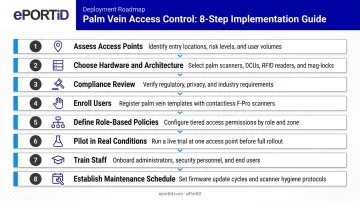
Implementation Steps
- Assess access points and security zones — map which doors need which assurance level
- Choose hardware and database architecture — PoE vs. standard wiring, on-premises vs. cloud
- Conduct compliance review — state biometric laws, consent templates, retention schedules
- Enroll users — use properly calibrated scanners; plan for accessibility exceptions
- Define role-based access policies — who accesses what, when, and under what conditions
- Pilot in real conditions — test with masks, gloves, PPE, varied lighting, and shift-change volumes
- Train staff — administrators on override procedures, end users on enrollment and daily use
- Establish maintenance schedule — sensor cleaning, firmware updates, log retention audits
Working With Specialists
For critical infrastructure deployments, deployment experience — not just product specs — separates a reliable rollout from a costly one. ePortID's background includes:
- 20 years of logistics and security work with the US Navy, Army JTF, Marine Corps, and Port Authorities
- Commercial deployments at Dow Chemical, Tata Steel, Thyssen Krupp, South Jersey Port Corp., and Fiserv
- Environments ranging from port gates and server rooms to industrial facilities requiring contactless, PPE-compatible access
Frequently Asked Questions
What is biometric access control?
Biometric access control is a physical security system that grants or denies entry by verifying a person's unique biological characteristics — fingerprints, face, iris, or palm veins — against a stored encrypted template. It replaces traditional credentials like keys, cards, and PINs with identity verification tied directly to the individual.
What are the 4 types of access control in security?
The four models are Discretionary (DAC), Mandatory (MAC), Role-Based (RBAC), and Attribute-Based (ABAC). Biometric technology serves as the identity verification layer within any of these models — it confirms who is at the door; the access policy determines what they're permitted to do.
What is the most accurate type of biometric access control?
Iris and palm vein recognition are among the highest-accuracy modalities due to the complexity and stability of the traits they measure. Palm vein scanning adds a liveness check — confirming blood flow beneath the skin — making spoofing with replicas or photos ineffective.
Can biometric access control integrate with existing security systems?
Most enterprise-grade systems integrate with existing platforms via Wiegand or OSDP protocols, and with HR or payroll software via standard data formats. ePortID supports both protocols and CSV/Excel employee record import — though confirming compatibility with your specific platforms before purchasing is always advisable.
What US privacy laws apply to biometric data in the workplace?
Illinois (BIPA), Texas, and Washington have enacted biometric-specific privacy laws requiring notice, written consent, defined retention policies, and secure storage. Additional states are expanding general privacy protections to cover biometric data. Consult a legal advisor for a state-by-state review before launching any enrollment program.
How long does it take for a biometric access control system to pay for itself?
Most organizations recover their investment within 3 to 6 months. Systems like ePortID's PalmClock eliminate buddy punching and reduce credential management overhead, with ongoing payroll savings continuing well beyond that window.