Introduction
Every week, construction project managers lose nearly two full days of productivity just reconciling manual time records. Nearly 40% of contractors still depend on paper-based time tracking, and studies show 80% of paper timesheets contain mistakes. These errors aren't just administrative headaches—they're financial liabilities. The ACFE's 2024 Report to the Nations documented that construction fraud victims reported median losses of $250,000, with time theft costing businesses between 1.5% and 5% of gross payroll annually.
Portable construction time clocks solve this by capturing verified clock-in data regardless of location, weather, or connectivity. The wrong system, though, can be just as costly — one that fails in cold weather, skips fraud prevention, or requires manual payroll re-entry simply trades one headache for another.
What follows is a side-by-side look at the top 5 portable time clocks for 2026 — evaluated on hardware durability, biometric accuracy, connectivity, and payroll integration — so you can match the right system to your jobsite.
Key Takeaways
- Portable construction time clocks range from rugged hardware devices to app-based digital solutions—best choice depends on crew size, site conditions, and fraud prevention needs
- Biometric verification eliminates buddy punching and protects payroll accuracy better than PINs or badges alone
- Offline capability, weatherproofing, and GPS/geofencing are non-negotiable for active job sites
- Top 5 options for 2026: SmartBarrel, ePortID, ExakTime JobClock Hornet, Connecteam, and TimePilot
- Most construction firms recoup the investment within 3–6 months through reduced time theft and faster payroll processing
What Is a Portable Construction Time Clock?
A portable construction time clock is a physical or digital device that lets workers clock in and out directly on the job site. Hardware units are weather-resistant, self-powered, and stationed on-site. Digital options turn smartphones or tablets into time stations through apps with GPS and geofencing.
The two core types serve different needs:
- Hardware clocks: Key fob, biometric, or badge-based devices stationed at the jobsite
- Digital clocks: App-based solutions with GPS tracking, geofencing, and kiosk modes
The best choice depends on site environment, crew size, and required identity verification strength. Features like biometric verification, real-time LTE connectivity, offline sync, and direct payroll integration now separate the leading options from basic punch-card replacements.
Top 5 Portable Construction Time Clocks for 2026
These five options were selected against five criteria:
- Durability in harsh field environments
- Identity verification strength (eliminating buddy punching)
- Connectivity reliability on remote sites
- Payroll software integration depth
- Ease of deployment without dedicated IT support
SmartBarrel
SmartBarrel is a construction-specific hardware time clock built for commercial and industrial job sites, offering solar power, LTE connectivity, and AI-powered facial recognition designed to function with masks, hardhats, and safety glasses.
Key differentiators:
- Magnetic mounting installs in minutes — no screws or wiring needed
- LTE sync pushes data to a cloud dashboard in real time
- Facial scan flags PPE compliance as workers clock in
- Damaged or stolen units are replaced at no charge
| Feature Category | Specifications |
|---|---|
| Key Features | Solar-powered, AI facial recognition, PPE detection, key fob/badge option, real-time LTE sync, geofencing |
| Power & Connectivity | Solar panel (standard) with LTE for real-time cloud updates; no Wi-Fi dependency |
| Pricing & Integrations | Contact vendor for pricing; integrates with Procore, CMiC, QuickBooks, Viewpoint, Foundation Software |
ePortID
ePortID delivers a contactless palm vein biometric time clock backed by 20 years of experience in logistics and security for US military and port authorities—now available for high-security construction applications including ports, refineries, power stations, and large infrastructure job sites.
The system uses Fujitsu palm vein scanning technology to identify workers from 5 million unique data points, verifying identity in under 2 seconds at 99.99991% accuracy. Key differentiators:
- Entirely contactless: no surface touch required at any point
- Credentials cannot be shared, duplicated, or spoofed — palm veins are unique even between identical twins
- Liveness detection runs on every scan, blocking spoof attempts
- Proven at scale: Tata Steel, Dow Chemical, and South Jersey Port Corp. are active clients
| Feature Category | Specifications |
|---|---|
| Key Features | Contactless palm vein biometric, liveness detection, 99.99991% accuracy, under-2-second verification, eliminates buddy punching |
| Power & Connectivity | Designed for fixed or semi-portable deployment; contact vendor for site-specific connectivity options |
| Pricing & Integrations | Contact ePortID directly at info@eportid.com or 215-627-2651; proven integrations with enterprise-level security and time/attendance systems |
ExakTime JobClock Hornet
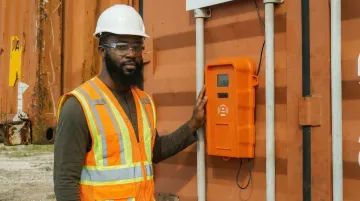
ExakTime JobClock Hornet is a rugged, battery-powered hardware time clock designed specifically for construction field teams—operating up to 21 days on a single charge via LTE connectivity, with offline data storage for remote sites without reliable signal.
Key differentiators:
- Radio-style weatherproof housing handles extreme heat, cold, and dust
- Key fob clock-in takes under 3 seconds per worker
- Optional FaceFront selfie verification adds a photo audit trail via mobile app
- Offline storage ensures no punches are lost when LTE signal drops
| Feature Category | Specifications |
|---|---|
| Key Features | Weatherproof rugged hardware, key fob ID, optional FaceFront selfie verification, offline sync, GPS mobile app |
| Power & Connectivity | Lithium-ion battery (up to 21 days); LTE data connection with hourly cloud sync |
| Pricing & Integrations | Contact vendor for device pricing; software base fee plus per-worker annual subscription; integrates with QuickBooks, ADP, Procore, Sage, Viewpoint, Foundation |
Connecteam
Connecteam is an all-in-one digital workforce management platform that turns any internet-connected smartphone or tablet into a portable time clock—ideal for construction teams that prefer a software-first approach without deploying dedicated hardware on every site.
Key differentiators:
- Geofencing restricts clock-ins to physical job site boundaries
- Kiosk mode supports shared devices with PIN or selfie verification
- Automated timesheets feed directly into QuickBooks and Gusto
- Scheduling, messaging, and HR tools are included beyond time tracking
| Feature Category | Specifications |
|---|---|
| Key Features | GPS tracking, geofencing, kiosk mode, selfie verification, automated timesheets, real-time overtime alerts |
| Power & Connectivity | Requires internet/Wi-Fi; iOS, Android, and web; no dedicated hardware needed |
| Pricing & Integrations | Free plan for up to 10 users; paid plans from $29/month for 30 users; integrates with QuickBooks, Gusto, and other payroll platforms |
TimePilot Tap / Extreme Blue
TimePilot offers two compact, offline-capable hardware clocks—the Tap (pocket-sized, USB-sync) and Extreme Blue (weatherproof, Bluetooth-sync)—designed for teams needing reliable, no-Wi-Fi time tracking without the cost of LTE-connected hardware.
Key differentiators:
- Four AA batteries power the Extreme Blue for up to one year
- Non-volatile memory retains all punch data even if the battery dies completely
- Supports up to 2,000 employees via iButton key fobs
- Device cost starts around $189 — significantly less than LTE-connected alternatives
| Feature Category | Specifications |
|---|---|
| Key Features | iButton/key fob ID, offline data storage, up to 2,000 employees, compact/pocket-sized hardware, non-volatile memory |
| Power & Connectivity | Battery-powered (up to 1 year); Bluetooth sync to smartphone or USB-to-PC sync; no LTE or Wi-Fi required |
| Pricing & Integrations | Device from ~$189 plus per-employee iButton and optional cloud license; data export to QuickBooks, ADP Run |
What to Look for in a Portable Construction Time Clock
Identity Verification Method
Identity verification is the most critical factor in preventing payroll fraud. Options vary widely in fraud protection strength:
- Key fob/PIN: Lowest fraud protection—can be shared or stolen
- Photo capture: Moderate protection—requires manual review
- Facial recognition: Strong but challenged by PPE and lighting
- Fingerprint: Unreliable with wet or dirty hands—EER nearly doubles in field conditions
- Contactless palm vein: Highest accuracy and hygiene for demanding environments
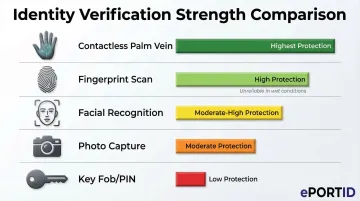
The choice directly impacts your ability to eliminate buddy punching—a practice affecting 75% of businesses—and protect payroll accuracy.
Power Independence and Weatherproofing
A device that fails in the field—from a dead battery or rain exposure—creates immediate payroll gaps. For job site use, verify these specs before purchasing:
- Power source: Solar, long-life battery, or hardwired—battery and solar are preferred for remote sites
- Dust and water resistance: IP65 or IP66 rating (dust-tight with water jet protection)
- Corrosion resistance: NEMA 4X enclosure for harsh or chemical-exposure environments
Connectivity Requirements
Connectivity determines how quickly payroll data reaches your systems:
- Real-time LTE sync: Best for live headcount monitoring and compliance reporting
- Hourly or Bluetooth sync: Acceptable for smaller teams
- Offline mode: Non-negotiable for remote sites—data must never be lost due to connectivity gaps
Payroll and Project Management Integration
A time clock that forces manual data re-entry into QuickBooks, Procore, or ADP adds the administrative burden digital tracking is supposed to eliminate. The Construction Financial Management Association notes that integrating field tracking with accounting/ERP systems reduces time and errors associated with manual re-entry.
Prioritize devices with direct, certified integrations to your existing payroll and project management platforms.
Ease of Deployment and Maintenance
The best portable construction time clocks check three boxes:
- Quick setup: Magnetic mount, no wiring or specialized installation required
- Low maintenance: No daily calibration or manual intervention needed
- Vendor replacement support: The vendor ships a replacement unit so equipment issues never cause downtime on active job sites
How We Chose the Best Portable Construction Time Clocks
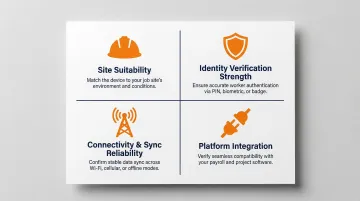
Each clock on this list was evaluated against four criteria that matter on an active job site:
- Site suitability — weatherproofing, rugged build quality, and flexible power options
- Identity verification strength — ability to prevent buddy punching and reduce time theft
- Connectivity and sync reliability — including offline performance when cell coverage drops
- Platform integration — compatibility with construction payroll and project management software
The most common mistake contractors make is prioritizing upfront device cost over total cost of ownership. GPS-only app solutions are a frequent offender: without biometric verification, time theft and payroll disputes continue unchecked, costing far more than the savings from a cheaper tool.
Conclusion
The right portable construction time clock depends on operational context. High-security infrastructure projects demand the highest biometric accuracy—palm vein or advanced facial recognition. Large commercial sites benefit from rugged, solar-powered hardware. Multi-site contractors with smaller crews may find app-based kiosk solutions more practical.
Before finalizing your decision, evaluate:
- Fraud prevention capability and biometric accuracy
- Payroll integration depth with your existing systems
- Total cost of ownership, not just device price
For construction sites in critical infrastructure, port, or industrial settings where workforce identity verification can't be compromised, ePortID's contactless palm vein biometric systems are worth a closer look. Most clients see full ROI within 3 to 6 months. Reach the team at info@eportid.com or 215-627-2651.
Frequently Asked Questions
How does a biometric time clock work?
Biometric time clocks capture a unique physical characteristic—fingerprint, face, or palm vein—at clock-in and compare it against a stored template to verify identity. The verified timestamp is recorded automatically, eliminating manual entry errors and preventing unauthorized clock-ins.
Are construction time clock apps free?
App-based options like Connecteam offer a free plan (up to 10 users), while hardware-based construction time clocks involve upfront device costs plus monthly software subscriptions. "Free" tools typically lack the identity verification features needed to prevent buddy punching on large job sites.
Are biometric time clocks legal?
Biometric time clocks are legal in most U.S. states, but some jurisdictions (such as Illinois under BIPA) require written employee consent and specific data storage policies before collecting biometric data. Consult applicable state or local laws before deployment.
How to keep track of hours worked as a contractor?
Contractors can track hours using portable hardware time clocks (key fob or biometric) stationed at job sites, or via GPS/geofencing mobile apps that record clock-in and clock-out locations. Integrating either method with payroll software eliminates manual timesheet errors.
What is the 7 minute rule for clocking in?
The 7-minute rule is a payroll rounding practice codified under FLSA regulations (29 CFR 785.48) where time worked up to 7 minutes past the scheduled start is rounded down, while 8 minutes or more rounds up. Digital time clocks can automate this rounding within payroll integrations to ensure compliance.