Introduction
Data centers invest heavily in perimeter fencing, mantraps, and biometric door scanners — yet the individual server cabinet often remains unsecured. This gap creates the most exploitable vulnerability in an otherwise layered security strategy. A recent study found that malicious insider attacks now cost an average of $4.92 million per incident, with 90% of privilege misuse breaches driven by internal actors. Room-level security fails when authorized users hold the door for others or when a single lost credential grants access to an entire data hall.
The difference between a compliant, effective deployment and an operational bottleneck comes down to four decisions: risk tiering, authentication method, integration depth, and policy design. Get any of these wrong, and you're left with compliance gaps — or controls that administrators route around entirely.
This guide covers:
- When rack-level control is actually necessary
- What infrastructure and policy groundwork to complete first
- A step-by-step implementation process
- Key authentication technologies to evaluate
- The mistakes most facilities make during rollout
Key Takeaways
- Rack-level access control secures individual server cabinets independently from room access — the last physical defense for your hardware
- Implementation requires four steps: risk assessment and tiering, hardware installation, authentication configuration, and centralized management integration
- Authentication options range from RFID and PIN to multi-factor and biometric methods; data sensitivity drives the choice
- Most failures trace to skipping risk assessment, relying on shareable credentials, and deploying locks without monitored audit trails
- PCI DSS, HIPAA, ISO 27001, and SOC 2 all mandate granular physical access controls that rack-level systems are built to meet
When Should You Implement Rack-Level Access Control?
Not every rack in a facility requires the same security investment. The decision should be driven by two key variables: the sensitivity of data hosted on that rack and the criticality of the equipment to facility operations.
Scenarios Where Rack-Level Control Is Necessary
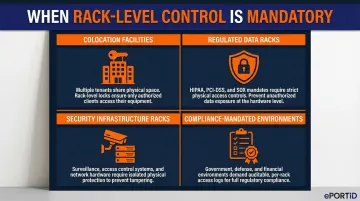
Rack-level control is a necessity — not optional — in these situations:
- Colocation facilities where multiple tenants share the same data hall; 18% of enterprise workloads now run in colocation environments, and 61% of colocation providers host hyperscalers, making cabinet isolation essential
- Racks housing regulated data such as financial transaction data, patient health records, or government classified systems
- Security infrastructure racks running cameras and access control servers — compromising these grants attackers control over the entire security layer
- Any environment subject to PCI DSS, HIPAA, FISMA, or NERC CIP requirements that mandate documented physical access controls
When Room-Level Security May Suffice
For racks containing non-sensitive or redundant systems in single-tenant facilities, room-level security may suffice. A tiered approach lets facilities protect the highest-risk cabinets first, then expand coverage as budget allows. In practice, this means starting with any rack that stores customer data, authentication credentials, or compliance-regulated workloads — and treating everything else as a lower-priority phase.
For racks containing non-sensitive or redundant systems in single-tenant facilities, room-level security may suffice. A tiered approach lets facilities protect the highest-risk cabinets first, then expand coverage as budget allows. In practice, this means starting with any rack that stores customer data, authentication credentials, or compliance-regulated workloads — and treating everything else as a lower-priority phase.
What You Need Before Implementing Rack-Level Access Control
Preparation determines whether the deployment delivers audit-ready protection or leaves exploitable gaps at the integration and policy layer. Rushed installations almost always fail at one of the three areas below.
Equipment and Hardware Requirements
Physical components required:
- Electronic swinghandle locks or cabinet lock modules compatible with standard rack form factors
- A reader device: RFID, keypad, or biometric scanner
- Mounting hardware for front and rear cabinet doors
Both front and rear access points often require independent locking. Cabinet-level security fails if a mechanical key still secures the rear door while the front uses biometric authentication.
Access Control Platform and Integration Infrastructure
Three integration decisions shape the rest of the deployment:
- Deployment model: standalone rack controller, existing building access control system, or DCIM platform
- Network connectivity: wired Ethernet, RS-485, or wireless — confirmed before hardware is ordered
- Credential database: whether Active Directory or LDAP can feed the system directly, avoiding duplicate provisioning workflows
ePortID's Door Control Unit (DCU) illustrates how these constraints translate to hardware. It's a PoE device (802.3at+ standard) supporting cable runs up to 100 meters, with Wiegand and OSDP protocol support for connecting to existing access control systems — no licensed electrician required.
Compliance and Access Policy Documentation
Before any hardware is installed, document:
- Which personnel roles require access to which rack tiers
- Time-window restrictions (no after-hours access for contractors)
- The compliance standard requirements the system must satisfy
This document serves two purposes: it drives the initial system configuration and becomes the primary evidence artifact when auditors ask for access justification records. With prerequisites in place, the actual deployment sequence becomes straightforward.
How to Implement Rack-Level Access Control in a Data Center
Step 1: Conduct a Rack Inventory and Risk Tiering Assessment
Walk through every rack in the facility and categorize it by risk tier:
- High: Sensitive regulated data, security infrastructure
- Medium: Business-critical operations
- Low: Non-sensitive or redundant systems
This tiering directly determines which authentication method and locking hardware to assign to each cabinet.
Capture per rack:
- Rack ID and location
- Contents/function
- Current access method (keyed lock or none)
- Tenant or owner
- Applicable compliance requirements
- Number of personnel who legitimately need access
Step 2: Select and Install the Electronic Locking Hardware
Selection criteria for electronic locks:
- Compatibility with the cabinet form factor
- Support for the chosen authentication input
- Fail-secure vs. fail-safe behavior (fail-secure keeps the door locked during power loss — preferred for high-risk racks)
- Support for both front and rear door coverage
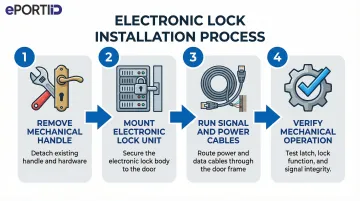
Physical installation process:
- Remove the existing mechanical handle or lock cylinder
- Mount the electronic swinghandle unit or lock module per manufacturer specification
- Run signal and power cables (PoE or dedicated power run)
- Verify mechanical operation before connecting to the access controller
Compliance and safety checks:
- Confirm the lock does not obstruct cable management
- Verify it does not interfere with airflow
- Retain installation documentation for the audit record
Step 3: Choose and Configure the Authentication Method
Map the authentication method to the risk tier established in Step 1:
- Single-factor RFID or smart card — appropriate for lower-risk racks
- PIN plus RFID — baseline multi-factor for medium-tier racks
- Contactless palm vein biometrics — required for the highest-sensitivity cabinets where credential sharing or theft is an unacceptable risk
Credential Enrollment Process
- Register user IDs, card tokens, PIN codes, or biometric templates in the access control platform
- Assign rack-specific permissions per user role
- Set time-based access windows where required
For high-tier racks, ePortID's palm vein biometric system — powered by Fujitsu technology — reads 5 million unique vein pattern data points that cannot be lost, shared, or duplicated. The F-Pro scanner delivers 99.99991% accuracy in under 2 seconds, enrolls in roughly 15 seconds per hand, and fits standard cabinet installations at just 29mm × 29mm × 13mm.
Step 4: Integrate with Central Management and Configure Audit Logging
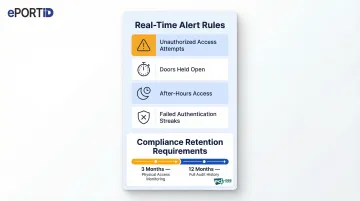
Connect the rack access controller to the centralized management platform (DCIM, PSIM, or building access system) so that all access events are captured in a unified dashboard with timestamp, user identity, rack ID, and door-open duration.
Configure real-time alert rules:
- Unauthorized access attempts
- Doors held open beyond a threshold
- After-hours access events
- Failed authentication streaks
These alerts should route to security operations via email, SMS, or SIEM integration.
Confirm that audit log retention meets the relevant compliance standard — for example, PCI DSS requires at least 3 months of retention for physical access monitoring data and 12 months for audit history. Generate a test report to verify the system is producing the evidence artifacts required for compliance review.
Key Authentication Technologies That Affect Rack Security Outcomes
The authentication method chosen is the single most consequential variable in rack-level security. It determines how resistant the system is to both insider misuse and external attack, and which compliance thresholds can be met.
RFID and Smart Card Authentication
RFID or proximity cards work at the rack by having the user tap a pre-enrolled badge against a cabinet-mounted reader, which signals the electronic lock to release. Cards integrate easily with existing building access infrastructure and allow a single credential for multi-zone access.
Core trade-off: Cards can be lost, loaned, or stolen, making them insufficient as a sole factor for high-sensitivity racks. Usage of easily cloned 125 kHz proximity cards has plummeted from 51% to 22% due to known vulnerabilities. They work best as one factor in a multi-factor setup.
PIN Code Authentication
Keypad-based PIN entry adds a "something you know" layer, particularly useful as a secondary factor when combined with RFID. On its own, PINs are vulnerable to shoulder surfing and informal sharing between colleagues.
Multi-Factor Authentication (MFA)
Combining two or more factors (for example, RFID card + PIN, or smart card + biometric) dramatically raises the barrier to unauthorized access. Microsoft research shows MFA blocks over 99.99% of unauthorized account compromise attacks — the same logic applies at the rack door.
Most high-security environments mandate MFA for any rack containing regulated data. Key implementation considerations include:
- Mandate MFA for racks holding regulated or sensitive data
- Modular electronic lock designs allow adding authentication layers without replacing base hardware
- Combine credential types (card + PIN, card + biometric) to address different threat vectors
Biometric Authentication
Biometric methods tie access rights to an immutable physical trait rather than a transferable credential — nothing to lose, share, or steal. Among available options, contactless palm vein scanning is particularly well-suited to data center environments:
- Works completely contactless, with no surface contact required
- Verifies identity in under 2 seconds per scan
- Reads internal vein patterns that cannot be copied, even from identical twins
- Includes liveness detection that confirms a living person is present, blocking spoofing attempts

The technology works by emitting low infrared light (comparable in strength to a television remote) to detect vein patterns beneath the skin.
Compliance advantage: Biometric audit trails provide irrefutable evidence of who accessed a specific rack, satisfying the most stringent auditor requirements under PCI DSS, HIPAA, and SOC 2.
Common Mistakes When Implementing Rack-Level Access Control
Treating All Racks Identically
Applying the same locking solution across every cabinet regardless of the data it holds wastes budget on low-risk racks while potentially under-protecting high-risk ones. The tiering step in the implementation process exists precisely to prevent this, yet it is routinely skipped in rushed deployments.
Relying Solely on Shareable Credentials
Deploying electronic locks but using only RFID cards or shared PIN codes provides traceability in name only. A card loaned to a contractor or a PIN written on a sticky note completely undermines the audit trail. Facilities managing sensitive data should enforce biometric or MFA for any Tier 1 rack.
Skipping Centralized Audit Integration
Electronic locks that log access locally but never connect to a central management system leave administrators blind. Without that integration, there's no real-time monitoring, no automated alerts, and no consolidated audit reports when compliance reviews arrive. The lock hardware alone is not a complete solution.
ASIS 2023 research reveals that tailgating is the top physical security failure at 61%, with propped doors at 50%. Room-level security fails when authorized users hold the door for others — cabinet-level controls with centralized logging prevent this vulnerability.
Neglecting Access Reviews and Offboarding
Many implementations are correctly deployed at launch but deteriorate over time as contractors leave, roles change, and old credentials accumulate. Two protocols prevent this drift:
- Quarterly permission audits: Review all rack access credentials on a fixed schedule and remove any that are stale or role-inappropriate
- Offboarding checklist: Document a step-by-step process that includes immediate credential revocation the moment a contractor or employee departs
Conclusion
Rack-level access control closes the critical gap that room and perimeter security cannot. It works best when grounded in a proper risk assessment, matched to the right authentication technology for the data sensitivity involved, and integrated into a centralized system that produces verifiable audit trails.
Three factors separate successful deployments from failed ones:
- Risk tiering first — define which racks hold sensitive assets before selecting hardware
- Policy documentation — written procedures prevent credential sharing and define accountability
- High-assurance credentials — technologies like palm vein biometrics eliminate the risks of lost, shared, or duplicated access cards entirely
Most implementation failures trace back to skipping one of these steps. The teams that get it right treat rack-level security as a process, not a product purchase — starting with a clear plan and selecting hardware that can't be worked around.
For high-sensitivity environments, ePortID's contactless palm vein authentication integrates directly into rack access systems, delivering sub-2-second verification with no credential to lose, share, or steal — a practical fit for the zero-tolerance access policies that server infrastructure demands.
Frequently Asked Questions
What is the difference between rack-level access control and room-level access control?
Room-level control governs entry to the data hall as a whole, while rack-level control authenticates users individually at each cabinet. Someone with room access cannot open a specific rack unless they are explicitly authorized for that cabinet.
Which authentication method is best for data center rack security?
The best method depends on data sensitivity. Biometric authentication (contactless palm vein scanning in particular) is the strongest option for high-risk racks — credentials cannot be shared, lost, or stolen. MFA combining RFID and PIN is appropriate for medium-tier cabinets.
What compliance standards require rack-level access control?
PCI DSS requires monitored, restricted physical access to cardholder data environments, HIPAA mandates controlled access to systems holding protected health information, and ISO 27001 and SOC 2 require equipment protection from unauthorized access. All require documented audit trails of who accessed which system and when.
Can rack-level access control be retrofitted to existing server cabinets?
Yes, most electronic lock systems are designed to replace existing mechanical handles or lock cylinders on standard rack enclosures without structural modification. Power cabling (often PoE) and network connectivity are the primary installation considerations.
How does biometric authentication improve rack security compared to RFID cards?
RFID cards can be lost, borrowed, or stolen, creating audit trail gaps. Biometric methods authenticate the person rather than the credential, ensuring the individual recorded in the access log is the individual who actually opened the rack, and cannot be bypassed by passing a card to an unauthorized colleague.
How should access rights be managed when personnel or contractors change?
Facilities should keep an access rights register linked to HR onboarding and offboarding workflows, run quarterly permission audits, and use centralized platforms that enable immediate credential revocation. With biometric systems, there is no physical credential to collect when someone leaves — access is simply revoked in the system.