Introduction
Hyperscale operator capital expenditure reached $127 billion in Q2 2024, representing a 72% year-over-year increase. That capital surge has pushed physical security to the center of operational risk management. While cybersecurity dominates headlines, a single unauthorized entry can expose servers to tampering and cause downtime that costs large-scale businesses an average of $9,000 per minute.
Physical access control is the essential first line of defense. More than half of organizations report that their most recent significant outage cost over $100,000, with 16% exceeding $1 million. Many of these incidents trace back to physical security gaps—unauthorized entry, credential sharing, or insider threats.
This guide breaks down how data centers defend against those gaps — from perimeter gates to server racks — covering access control system types, biometric authentication, and the compliance requirements that make audit readiness non-negotiable.
What Is Access Control in a Data Center?
Data center access control is the integrated set of policies, technologies, and physical mechanisms that regulate who can enter a facility and which specific zones—lobby, data hall, server cage, individual rack—they are permitted to access, and under what conditions. This system determines not just building entry, but granular access to specific areas based on role, time, and business need.
Physical access control protects the hardware itself: servers, storage arrays, networking equipment, cooling systems, and power infrastructure. Unlike cybersecurity, which defends against digital threats, physical access control prevents unauthorized individuals from directly interacting with equipment.
If an intruder gains access to the central processing unit, it is usually possible to reboot the system and bypass logical access controls, leading to information disclosure, fraud, or system compromise. Encryption and network security offer no protection once someone has hands-on access to the hardware.
That reality shapes how data centers are designed from the ground up. The guiding philosophy is least privilege: grant every person—employee, contractor, or visitor—only the minimum access their role requires. NIST SP 800-53 defines this as "allowing only authorized accesses necessary to accomplish assigned organizational tasks."
In practice, this plays out across multiple physical layers:
- Perimeter: building entrance, parking, and loading dock access
- Reception/lobby: visitor check-in and escorted entry zones
- Data hall: server room entry restricted to authorized technical staff
- Server cage/cabinet: rack-level access limited to specific teams or tenants
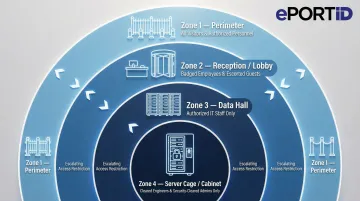
All access across these layers must be tracked, logged, and periodically reviewed to ensure permissions stay current.
Types of Access Control Systems Used in Data Centers
Role-Based Access Control (RBAC)
RBAC assigns access permissions based on job function rather than individual identity. A network technician receives access to server halls but not executive operations rooms; a facilities manager accesses cooling systems but not customer data cages. RBAC simplifies identity management by grouping users with similar access needs by role, allowing administrators to update roles rather than managing thousands of individual permissions.
Mandatory Access Control (MAC)
MAC enforces access decisions based on predefined security classifications set by the system — not by users or resource owners. It's common in government, military, and critical infrastructure facilities where no individual should override security policy. Who gets in is determined by clearance level and need-to-know criteria — period.
Discretionary and Attribute-Based Access Control
Discretionary Access Control (DAC) allows resource owners to grant or revoke access at their discretion — flexible, but risky when owners make poor security decisions.
Attribute-Based Access Control (ABAC) makes dynamic decisions based on multiple factors:
- User role and clearance level
- Time of day and location
- Device type and security posture
ABAC is capable of enforcing both DAC and MAC concepts, which is why it's well-suited to large data center environments where a single user may need different access rights depending on what system they're on and when.
Physical Credential Types and Their Vulnerabilities
Logical access models define who should get in. Physical credentials are the mechanism that tries to enforce it — and that's where many systems fall short.
Traditional credentials include:
- Keycards and RFID badges – Proximity cards that unlock doors when scanned
- PINs – Numeric codes entered at keypads
- Mobile credentials – Smartphone-based digital keys
The core vulnerability: these systems verify the credential, not the person holding it. Keycards can be lost, cloned, stolen, or shared. About 88% of breaches reported within credential-based attack patterns involved the use of stolen credentials. A valid card in the wrong hands grants full access.
Biometric authentication closes this gap by verifying the person, not the token they carry. Palm vein scanning, for example, reads the unique vascular pattern beneath the skin — a pattern that can't be lost, cloned, or handed off. The credential is the person, which makes theft or sharing functionally impossible.
The Multi-Layered Security Model: From Perimeter to Server Rack
Defense-in-Depth Principle
Rather than relying on a single secure entry point, enterprise data centers deploy multiple concentric security zones, each requiring its own authentication. A breach at one layer does not compromise the entire facility — attackers must overcome every barrier sequentially. The four zones below show how that model works in practice.
Zone 1 — Perimeter Boundary
The outermost ring includes:
- Perimeter fencing and bollards
- Vehicle access controls with license plate recognition
- RFID gate readers for authorized vehicles
- Perimeter sensors detecting intrusion attempts
- 24/7 surveillance cameras covering all approaches
The goal is to restrict and monitor every individual and vehicle before they reach the building. The system flags unauthorized vehicles and logs all entry attempts.
Zone 2 — Building Entry
Identity verification escalates at the building entrance. Multi-factor authentication (MFA), biometric scanners, and visitor management systems ensure only approved individuals cross this threshold. Visitor escort policies and temporary badge protocols document every non-employee entry with time-stamped records.
Visitor management typically requires:
- Pre-registration with identity verification
- Photo capture and badge printing
- Escort assignment for all movement
- Automatic credential expiration after approved window
Zone 3 — Data Hall and Cages
Within the building, role-based access and zone management restrict movement to designated areas. Anti-tailgating systems prevent credential sharing and unauthorized following:
- Mantraps – Dual-door vestibules that allow only one person through at a time
- Turnstiles – Physical barriers requiring individual credential presentation
- AI-video analytics – Computer vision systems detecting tailgating behavior
- Anti-passback controls – Systems tracking real-time location so a credential cannot be "passed back" through a door to someone else
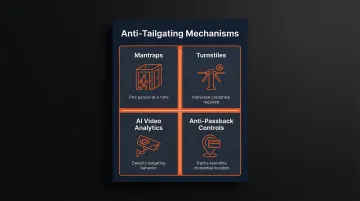
Anti-passback ensures that a credential cannot be passed back to another person for re-entry, tying access to a specific individual and their real-time location.
Zone 4 — Cabinet and Server Racks
The innermost layer uses electronic locks and access readers on individual racks, providing the most precise level of control available. This matters most in colocation environments, where multiple clients share physical space and one client must never reach another's equipment. Every access event generates an audit log capturing:
- Which rack was accessed and by whom
- Exact entry and exit timestamps
- Duration of each access session
- Credential used for authentication
Why Biometric Access Control Is the Most Secure Option for Data Centers
The Fundamental Advantage
Unlike keycards or PINs that authenticate a credential, biometrics authenticate the person. The biological trait cannot be forgotten, lost, shared, or stolen. That difference eliminates the core vulnerabilities of traditional access methods at the source. Having a lower level of physical authentication to spaces housing critical IT resources could lead to breach of data or networks.
Common Biometric Types
Fingerprint scanners achieve approximately 1.9% false negative identification rates for single index fingers. They're widely deployed but require physical contact, raising hygiene concerns in shared environments.
Facial recognition offers contactless convenience but can be affected by lighting conditions, facial hair changes, or aging. Accuracy varies significantly by algorithm and implementation quality.
Iris scanning delivers approximately 1 in 175 false non-match rate at 1 in 100,000 false match rate, providing high accuracy but requiring precise positioning and cooperation from users.
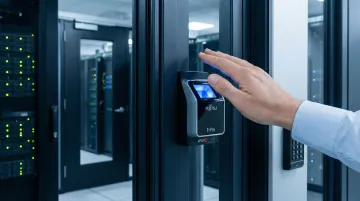
Palm vein scanning reads the vascular pattern beneath the skin using infrared light — a pattern derived from millions of unique data points and unique to every individual, even identical twins. Because the pattern exists entirely below the skin's surface, it cannot be replicated from a photograph, mold, or any external source.
ePortID's Fujitsu F-Pro palm vein scanner achieves 99.99991% accuracy with under 0.00001% false acceptance rate and completes verification in under 2 seconds. This combination of accuracy and speed makes it practical for high-throughput data center environments where hundreds of employees may access facilities during shift changes.
Liveness Detection: Preventing Sophisticated Spoofing
Liveness detection confirms the biometric is from a living person in real time — not a spoofed image, lifted fingerprint, or prosthetic. This capability is formalized in ISO/IEC 30107-1:2023, which defines Presentation Attack Detection (PAD) as automated discrimination between genuine presentations and biometric attacks.
Palm vein scanners check for liveness by detecting blood flow patterns beneath the skin using infrared light. Without active circulation, no vein pattern appears—making it impossible to authenticate using photographs, prosthetics, or severed appendages. This built-in liveness verification during every scan resists even sophisticated spoofing attempts.
Multi-Factor Authentication in Data Centers
Combining biometric verification with a second factor — keycard or PIN — creates layered credentials far harder to compromise. For the most sensitive zones (server racks, critical infrastructure rooms), NIST SP 800-171 now requires MFA for local and network access to privileged accounts, making layered authentication the baseline expectation for regulated environments.
A typical two-factor implementation requires:
- Employee presents RFID card (something you have)
- Employee scans palm vein (something you are)
Both factors must validate before access is granted. This closes the most common gap in card-based systems: a stolen keycard is useless without the registered biometric to match it.
Compliance Requirements and How Access Control Supports Audit Readiness
Key Regulatory Frameworks
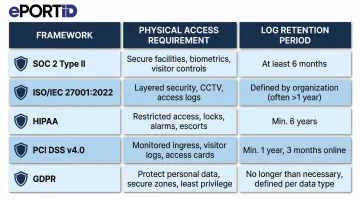
Five major frameworks directly govern physical access controls in data center environments:
| Framework | Physical Access Requirement | Log Retention |
|---|---|---|
| SOC 2 Type II | Restrict access to facilities, backup media, and sensitive locations; controls must operate effectively over time | Varies by auditor scope |
| ISO/IEC 27001:2022 (A.11.1.2) | Documented policies and technical controls enforcing access restrictions for authorized personnel only | Per organizational policy |
| HIPAA (45 CFR § 164.310) | Limit physical access to systems housing electronic health information; permit only authorized entry | 6 years from creation or last effective date |
| PCI DSS v4.0 (Req. 9.1) | Restrict and monitor physical access to all areas containing cardholder data | Visitor logs: 3 months; system logs: 12 months (3 months immediately available) |
| GDPR (Article 32) | Implement appropriate technical and organizational measures commensurate with risk level | No fixed period; "appropriate" retention required |
Each framework demands more than locked doors — auditors want documented proof that controls worked, consistently, over time.
Audit Readiness in Practice
Auditors don't just confirm that access policies exist — they pull records. Every access event must be documented with a timestamp, credential identifier, zone, and outcome. That data needs to be retrievable on demand, not reconstructed after the fact.
Retention requirements are embedded in the table above. The practical implication: your access control system must log automatically and store those logs in a tamper-evident, exportable format from day one.
Reducing Compliance Burden
The right access control system turns audit preparation from a sprint into routine maintenance. Look for platforms that include:
- Continuous event logging with timestamp, credential ID, and access outcome for every attempt
- Real-time anomaly alerts flagging unusual patterns or repeated failed entries
- Cloud-stored, tamper-evident records accessible through a centralized management dashboard
- Pre-formatted exportable reports mapped to specific framework requirements
Organizations that deploy systems with these capabilities typically cut audit response time by days — not because the requirements changed, but because the evidence is already organized.
Best Practices for Strengthening Data Center Access Control
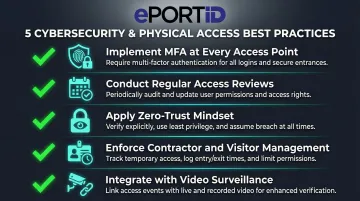
Implement MFA at every sensitive access point. Two-factor authentication combining biometrics with cards or PINs reduces unauthorized access risk. NIST SP 800-171 recommends multifactor authentication for privileged accounts.
Conduct regular access reviews. Quarterly audits should verify that credentials match current employment status and job roles. Deactivate unused credentials immediately and revoke access for departed staff or contractors on termination day—nearly 40% of organizations have suffered major outages caused by human error, including failures to follow procedures.
Apply a zero-trust mindset. Verify identity at every checkpoint rather than assuming anyone already inside the building can be trusted everywhere. Modern zero-trust architectures adapt by moving away from implicit trust and implementing fine-grained access decisions based on continuous verification.
Enforce rigorous contractor and visitor management:
- Issue time-limited credentials that automatically expire
- Require escorts for all visitors in sensitive zones
- Document the reason for every access request
- Verify visitor identity before granting temporary permissions
- Maintain visitor access records for organization-defined time periods
Integrate access control with video surveillance and alarm systems. Physical controls alone aren't enough—correlating access logs with surveillance footage makes it easier to spot suspicious or unauthorized behavior in real time. Linking each access event to corresponding footage creates comprehensive audit trails and gives investigators concrete footage to work from.
Frequently Asked Questions
Which access control method is the most secure for a data center access control system?
Biometric multi-factor authentication—particularly contactless biometrics like palm vein scanning combined with a keycard or PIN—is the most secure method. It verifies the individual directly rather than a credential that can be lost, cloned, or shared, while adding a second factor prevents reliance on any single authentication mechanism.
What is biometric access control as used in data security?
Biometric access control verifies identity using unique biological traits such as fingerprints, facial features, iris patterns, or palm vein structures. Because these traits can't be replicated or transferred, biometrics eliminate the vulnerabilities found in keycards and PINs.
What is mandatory access control (MAC) for multilevel security?
MAC is a model where access permissions are enforced by the system based on fixed security classifications, not by individual users. Commonly used in government, military, and critical infrastructure environments, MAC ensures that no single user can override security policies or grant unauthorized access.
What are the 4 types of access control?
The four primary types are:
- RBAC (Role-Based): permissions assigned by job function
- MAC (Mandatory): system-enforced security classifications
- DAC (Discretionary): resource owners grant access
- ABAC (Attribute-Based): dynamic decisions based on context
Most modern data centers use RBAC as a foundation and layer in additional models for sensitive zones.
What are the types of key control?
Key control governs physical key access to server cages and restricted areas. Common approaches include:
- Electronic key management systems: log checkouts and require credential verification
- Dual-authorization keys: require two users to sign out high-sensitivity keys
- Audit-trail cabinets: record every access event with timestamps and user ID
What are the five R's of key control?
The five R's give data center managers a systematic way to account for every physical key:
- Rationale: document why each key exists
- Records: maintain accurate key inventories
- Retrieval: control key checkout and return
- Rotation: periodically change locks and keys
- Replacement: replace lost or compromised keys