Introduction
Access control failures plague organizations globally. According to an ASIS International survey, over 90% of organizations reported an access control failure within the past six months, with tailgating and piggybacking cited by 61% of security professionals. Keycards get lost, PINs get shared, and passwords get stolen—but biometric identifiers remain immutable. The American Payroll Association reports that 75% of U.S. businesses are affected by buddy punching—a form of time theft that costs employers an estimated $373 million annually. Both problems share the same root cause: identity that can be faked.
Yet upgrading legacy access infrastructure with biometrics isn't as simple as swapping out a card reader. Real-world outcomes depend on four variables: infrastructure compatibility, technology selection, enrollment quality, and compliance readiness. A system that performs flawlessly in an office lobby can fail on an oil rig or refinery floor if those factors aren't assessed upfront.
This guide walks through what you need to deploy biometrics successfully:
- Pre-integration requirements and site assessment
- Step-by-step deployment process
- Variables that affect long-term accuracy
- Common mistakes that derail even well-funded projects
Key Takeaways
- Audit existing hardware, software, and network infrastructure before selecting any biometric technology
- Match modality to environment — fingerprint degrades in industrial settings; palm vein and facial recognition handle harsh conditions better
- Enrollment quality determines long-term accuracy; poor initial capture causes persistent false rejections in production
- Connect biometrics to existing systems via compatible APIs or middleware (OSDP, Wiegand, LDAP) — not as a standalone system
- Address BIPA, GDPR, CCPA, or HIPAA compliance before deployment, not after
What You Need Before Integrating Biometric Authentication Into Existing Systems
Preparation directly determines whether biometric integration succeeds or becomes a costly retrofit. Many deployments stall before the first scan because organizations buy hardware without confirming their existing infrastructure can communicate with it.
Equipment and Infrastructure Requirements
Before any biometric hardware is installed, confirm your facility meets these minimum technical prerequisites:
- Compatible access control panels or IAM platforms that support open protocols such as OSDP, LDAP, or REST API
- Network infrastructure with sufficient bandwidth to handle real-time biometric data transmission without latency or timeouts
- Existing door hardware or server access points capable of supporting electronic lock release signals
If your facility currently runs standalone or proprietary access systems with no integration interfaces, you'll need either middleware solutions or a phased hardware upgrade before biometric readers can be added.
Legacy Wiegand protocols transmit data in plain text, leaving credentials exposed to interception with basic cloning tools. The Security Industry Association's OSDP v2.2.2 addresses this directly with AES-128 encryption and bidirectional supervision — upgrade to it before adding biometric readers to any existing panel.
Compliance and Legal Readiness
Biometric data is classified as sensitive personal information in most regulatory frameworks. Before any templates are captured, confirm that you have:
- A data handling policy documenting where templates are stored, how they're encrypted, and which roles have access
- A written consent process with records retained per your jurisdiction's requirements (Illinois BIPA, for example, mandates a publicly available retention schedule)
- A storage architecture decision — some jurisdictions require on-device or smart card storage rather than centralized databases, and this must be resolved before deployment
| Regulation | Jurisdiction | Key Requirements |
|---|---|---|
| BIPA | Illinois, USA | Requires written consent and public retention schedules; violations carry $1,000–$5,000 statutory damages per incident |
| GDPR | European Union | Classifies biometrics as "special category" data; requires explicit consent or substantial public interest |
| CCPA | California, USA | Classifies biometric data as "sensitive personal information" with consumer opt-out rights |
| HIPAA | Healthcare (USA) | Classifies biometric identifiers as Protected Health Information (PHI) when linked to health records |
The financial exposure for getting this wrong is substantial. BNSF Railway agreed to a $75 million settlement for BIPA violations tied to fingerprint scanning, while Kronos settled a comparable class action for $15.3 million. Both cases stemmed from compliance gaps that a pre-deployment legal review would have caught.

How to Integrate Biometric Authentication Into Existing Systems
Step 1: Conduct a Security and Infrastructure Assessment
Map the full scope of what needs to be secured:
- Physical access points: Entry doors, server rooms, controlled substance storage, loading docks, vehicle gates
- Digital logins: Workstations, cloud applications, VPNs, privileged access management systems
- Time and attendance terminals: Shift check-in, payroll systems, HR platforms
- Third-party platforms: SIEM tools, audit logging systems, compliance reporting software
Audit your current access control infrastructure for integration readiness. Check whether existing controllers, panels, and network switches can communicate with biometric readers via standard protocols. Document any gaps that require hardware replacement or middleware bridging.
Identify high-risk points where biometric authentication would provide the greatest security uplift—server room entry in data centers, shift check-in at ports or refineries, controlled substance storage in healthcare facilities. Prioritize these areas for phased deployment.
Step 2: Select the Right Biometric Technology for Your Environment
The biometric modality you choose must match your operational environment. Here's how the primary modalities compare against real-world conditions:
Fingerprint: Works well in controlled office settings but degrades with moisture, dirt, or extreme dryness. Industrial workers with damaged hands or those wearing gloves experience high false rejection rates.
Facial Recognition: Fast and contactless, but accuracy suffers with face coverings—NIST reports that masks can increase false rejection rates from 0.2%-0.4% to 1%-3%. Lighting conditions and aging also impact performance over time.
Iris Scanning: Offers exceptional accuracy—NIST benchmarks show the most accurate 1:N matchers yield a False Negative Identification Rate (FNIR) of 0.0067. However, it requires close-range cooperation and controlled positioning, making it impractical for high-throughput environments.
Palm Vein Scanning: Contactless, highly accurate, and resilient to surface conditions. It reads internal vascular patterns beneath the skin, providing inherent liveness detection that photographs and replicas cannot defeat. Independent evaluations of Fujitsu's PalmSecure technology show a False Acceptance Rate (FAR) below 0.00001%.

For critical infrastructure environments, target extremely low FAR (near-zero unauthorized access) even if it means slightly higher FRR. ePortID's contactless palm vein scanning technology, developed in partnership with Fujitsu, uses 5 million data points to generate a unique identifier—accurate to 99.99991% and completing authentication in under 2 seconds. The system includes built-in liveness detection, making it purpose-built for high-stakes environments like seaports, refineries, data centers, and military facilities where contact-based options fail.
Step 3: Plan the Integration Architecture and Data Flow
Define how biometric data will flow between components:
- Reader hardware captures the biometric sample
- Matching engine compares the live sample against stored templates
- Downstream systems — access control software, HR platforms, payroll, audit logs — receive the authentication result
Determine whether integration will use direct API connections, middleware, or a unified identity management platform. Each approach has trade-offs in complexity, latency, and vendor lock-in.
Choose your data storage model based on compliance and security requirements:
- On-premise servers: Keeps data residency fully in your control — the standard choice for regulated industries with strict sovereignty requirements
- Cloud storage: Enables consistent template access across multiple sites for organizations with distributed locations
- Hybrid models: Split sensitive templates on-premise while using cloud infrastructure for cross-site coordination and scalability
Document which biometric templates are stored where and how they are encrypted at rest (AES-256 recommended) and in transit (TLS 1.2 or higher).
Design fallback authentication from the start. Backup credentials—PIN, admin override, or secondary RFID card—must exist for cases where biometric authentication fails due to injury, illness, or equipment malfunction. These fallbacks must be secured to prevent them from becoming security workarounds that undermine the system.
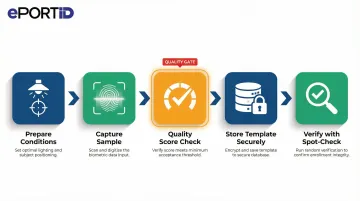
Step 4: Enroll Users and Capture Biometric Templates
Conduct enrollment systematically under consistent conditions:
- Controlled lighting for facial or iris capture
- Proper hand positioning for palm vein or fingerprint
- Clean scanner surface to avoid contamination or degradation
Poor capture quality at enrollment is the leading cause of false rejections in production. ISO/IEC 29794 standards establish formal guidelines for biometric sample quality assessment.
For large workforces, plan enrollment in phases by department or shift to minimize operational disruption. Allocate sufficient time per person—capture multiple samples—and train enrollment operators on what constitutes an acceptable scan quality score.
Store resulting biometric templates in the secure database with proper access controls. Link each template to the corresponding user record in the HR or access management system. Conduct verification spot-checks before declaring enrollment complete.
Step 5: Test, Go Live, and Monitor Performance
Run parallel testing before full cutover. During this period:
- Operate the biometric system alongside existing credentials for a defined window
- Compare authentication logs to identify false rejections or configuration errors
- Resolve hardware issues before retiring legacy credentials
Define performance benchmarks prior to go-live:
- Acceptable authentication speed (typically under 3 seconds)
- Maximum false rejection rate (typically under 1%)
- System uptime requirements (99.9% or higher for critical infrastructure)
- Alert thresholds for failed authentication attempts
Establish ongoing monitoring protocols:
- Review authentication logs regularly for anomalies
- Schedule hardware cleaning and maintenance for readers
- Update biometric templates for users whose physical characteristics change over time
- Run periodic audits against the access control database to remove departed employees promptly
Key Parameters That Affect Biometric Integration Results
Even a correctly installed biometric system will underperform if these variables are not controlled. The decisions made before and during deployment matter just as much as the hardware you choose.
Biometric Modality and Accuracy Specifications
Different modalities carry different accuracy levels and failure modes. Choosing technology based on cost alone — without evaluating FAR/FRR against your environment's risk profile — leads to either security gaps or persistent false rejections that frustrate users.
NIST benchmarks show top-tier facial recognition achieving FNIR below 0.3% for high-quality images. The most accurate fingerprint algorithms reach FNIRs of 1.9% for single index fingers, improving to 0.09% for ten-finger flats. Palm vein technology — such as ePortID's Fujitsu F-Pro system — achieves 99.99991% accuracy and verifies identity from 5 million unique vein points, a pattern no two people share, including identical twins.
Network Infrastructure Quality
Biometric systems transmit image or template data between readers and servers in real time. A slow or bandwidth-constrained network introduces authentication delays, timeouts, and user friction — particularly in high-traffic facilities.
Modern readers are fast. Facial recognition terminals can achieve up to 4,000 matches per second; fingerprint modules complete 1:1 verification in roughly 1.6 seconds. Your network needs to keep pace with those speeds, especially across multi-site deployments or facilities with many simultaneous access events.
Enrollment Data Quality
The template captured at enrollment is the baseline for every future authentication. A poor-quality capture — bad lighting, wrong positioning, dirty scanner — creates persistent false rejections for that user throughout the system's life.
Two practices make a measurable difference:
- Set minimum quality score thresholds so the system rejects low-quality scans at enrollment rather than accepting them
- Train enrollment operators to distinguish acceptable from unacceptable captures before finalizing any registration
Environmental Conditions at the Reader
Dust, moisture, extreme temperatures, direct sunlight, and heavy industrial contamination all degrade scan quality and accelerate hardware wear. The reader's physical environment is not a secondary concern — it directly affects authentication reliability.
For deployment considerations by environment type:
- Controlled indoor spaces (offices, server rooms): most modalities perform reliably
- Industrial or outdoor sites (refineries, ports, oil rigs): contactless modalities — palm vein, facial — are significantly more resilient than contact-based fingerprint readers
- Harsh or high-contamination environments: prioritize hardware rated IP65 or IP67 for dust and water resistance
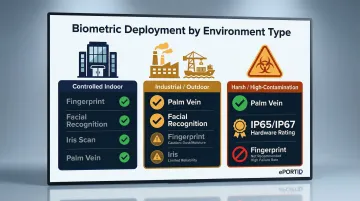
Contactless palm vein scanning is particularly well-suited to demanding environments because the reader never touches the user, eliminating contamination-related scan degradation entirely.
Common Mistakes When Integrating Biometric Authentication
Most integration failures trace back to the same handful of avoidable errors. Catching them before deployment saves time, budget, and the kind of operational disruption that's hard to walk back.
Skipping the compatibility audit. Purchasing biometric hardware before confirming your access control panels, HR software, and network infrastructure can communicate with it is one of the most expensive mistakes you can make. According to ASIS International's access control technology report, 34% of access control failures stemmed from poor implementation or choosing the wrong technology — not from the hardware itself.
Underestimating enrollment time. A single-day enrollment plan rarely survives contact with reality. Capturing quality biometric templates across hundreds or thousands of workers on multiple shifts takes weeks of scheduling, operator training, and template quality review. Incomplete enrollment at go-live is a leading cause of Day 1 access failures.
Treating compliance as an afterthought. Collecting and storing biometric data without a documented consent process, retention policy, and breach notification procedure creates regulatory and legal exposure. BIPA class-action lawsuits targeting employers are a direct result of this pattern — and the remediation often forces a full system redesign.
Testing only success scenarios. Most QA cycles validate that authentication works when everything goes right. The gaps surface during real incidents: a reader goes offline, the network drops, or a worker can't authenticate due to injury or environmental conditions. Explicit failure-mode testing — before go-live — is what separates a resilient deployment from a fragile one.
When Biometric Integration Makes Sense (and When It Doesn't)
Biometric authentication is not the right choice for every access point or organization. The operational overhead and upfront investment only make sense in specific situations.
Situations Where Biometric Integration Delivers Clear Value
- High-consequence environments: Data centers, server rooms, research labs, power stations, oil rigs, military facilities, financial institutions, hospitals—anywhere security breaches carry severe consequences
- Payroll fraud prevention: Workplaces where buddy punching or shared credentials inflate payroll costs; Nucleus Research reports buddy punching accounts for 2.2% of gross payroll
- High-throughput access: Facilities processing high volumes of authorized users who need fast, frictionless, credential-free entry
- Credential management overhead: Any setting where lost or stolen access cards repeatedly create security gaps or administrative burden
ePortID has deployed contactless palm vein systems across US Navy facilities, port authorities, and industrial sites including Dow Chemical and Tata Steel — each selected because the security stakes justified the integration.
Situations Where Biometric Integration May Be Premature
- Low-traffic areas: Where cost-per-door exceeds the security risk
- Insufficient IT infrastructure: Organizations without the resources to manage biometric data properly
- Temporary deployments: Where enrollment overhead outweighs operational benefit
- Physical incompatibility: Environments where users have physical characteristics that consistently degrade recognition accuracy (certain medical conditions, heavy-equipment gloves that cannot be removed, extreme outdoor lighting)
Scale and Phasing Considerations
Large enterprises and multi-site operations benefit most from a phased rollout. Start with the highest-risk access points, validate the integration, then expand systematically. This approach distributes enrollment strain and lets IT teams address edge cases before scaling organization-wide.
Conclusion
Successful biometric integration into existing systems depends on three things working together: thorough pre-deployment readiness (infrastructure, compliance, technology selection), disciplined execution of enrollment and system testing, and ongoing monitoring after go-live. Shortfalls in any one of these phases produce the failures that give biometrics an undeserved bad reputation.
The technology choice must match the operating environment. For critical infrastructure, contactless systems with liveness detection and verified accuracy aren't optional upgrades — they're table stakes. Evaluate solutions against performance benchmarks measured in real deployments rather than feature lists alone, and ensure your plan addresses infrastructure compatibility, compliance requirements, and enrollment quality from day one. ePortID's palm vein scanning systems, built on 20 years of security experience across ports, military facilities, and enterprise environments, are designed to meet exactly these standards out of the box.
Frequently Asked Questions
What are the 5 main types of biometric authentication?
The five primary modalities each suit different environments:
- Fingerprint recognition — most common for general access
- Facial recognition — fast and contactless
- Iris/retinal scanning — highest accuracy, requires close range
- Voice recognition — convenient for remote authentication
- Palm vein scanning — contactless and highly resistant to spoofing
Choosing the right modality depends on your security tier, throughput requirements, and environmental conditions.
How much does biometric technology cost?
Costs vary widely based on modality, number of access points, and integration complexity. Hardware, enrollment, software licensing, and infrastructure upgrades all factor into total cost of ownership. Most organizations find ROI within 3-6 months through reduced payroll fraud, eliminated buddy punching, and lower credential management overhead—often saving 2-3% of gross payroll annually.
Can biometric systems be integrated with existing access control or HR software?
Yes, most modern biometric systems support integration via open APIs, OSDP, LDAP, or middleware. Compatibility should be verified before purchase. Many enterprise deployments connect biometric readers directly to payroll and HR platforms, automating time and attendance with a direct data flow from authentication to payroll — no manual entry required.
What happens if a user cannot be authenticated by the biometric system?
Reliable systems include fallback authentication methods (PIN, admin override, or secondary credential) to handle injury, illness, or equipment failure. These fallback paths must be built into the system architecture from the start and audited regularly to prevent them from becoming security bypasses that undermine the deployment.
Is biometric data secure, and who owns it?
Biometric templates are encrypted and stored separately from personal identifiers. The employing organization or facility operator is typically the data controller, with BIPA, GDPR, and CCPA imposing obligations on collection, storage, and deletion. AES-256 encryption and TLS 1.2+ transmission protocols are the baseline standards for template protection.
How long does biometric enrollment take for a large workforce?
It depends on the modality and workforce size. Palm vein scanning enrolls each hand in roughly 15 seconds, but scheduling, operator training, and quality verification across hundreds of users typically requires a phased rollout spanning several days to weeks. Planning that rollout upfront prevents bottlenecks and protects template quality.