Introduction
A lost keycard takes seconds to clone. A stolen badge can pass through a checkpoint undetected for weeks before anyone notices. For facilities managing critical infrastructure — seaports, data centers, hospitals, military installations — this gap between issuing a credential and trusting it is where security breaks down. Biometric access control eliminates that gap entirely.
The wrong access control choice creates compounding problems: lost cards enable unauthorized entry, buddy punching inflates payroll costs, tailgating compromises restricted zones, and compliance gaps trigger regulatory penalties.
In healthcare, finance, and critical infrastructure, those aren't minor inconveniences. They expose your organization to theft, data breaches, and regulatory action with real financial consequences.
This guide breaks down both systems across security strength, operational cost, compliance requirements, and deployment complexity — so you can make the right call for your facility.
Key Takeaways
- Keycards are affordable and quick to deploy, but vulnerable to loss, theft, and cloning
- Biometrics verify identity using physical traits — credentials that can't be lost, shared, or stolen
- Keycards work well for general-access environments with moderate security needs and tight budgets
- Biometrics are essential for high-security facilities where unauthorized access carries serious consequences
- Biometrics typically pay for themselves within months — making the higher upfront cost a short-term trade-off
Keycard vs. Biometric Access Control: Quick Comparison
| Factor | Keycard Access Control | Biometric Access Control |
|---|---|---|
| Security Level | Moderate — vulnerable to loss, sharing, cloning | High — credential cannot be transferred or duplicated |
| Upfront Cost | Low — inexpensive readers and cards | Higher — specialized hardware and software |
| Ongoing Cost | Moderate to high — replacements, admin overhead, fraud losses | Low — no replacements, less admin, no buddy punching |
| Credential Loss/Fraud Risk | High — cards lost, stolen, loaned, or cloned | Zero — biometric traits cannot be lost, shared, or duplicated |
| Best-Fit Environments | General offices, residential buildings, low-risk facilities | Critical infrastructure, restricted zones, high-security facilities |
What Is Keycard Access Control?
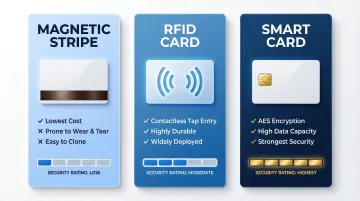
Keycard access control uses plastic cards embedded with authentication technology — magnetic stripes, RFID chips, or smart card microprocessors — that verify identity when swiped or tapped against a reader. The three main types differ in security and durability:
- Magnetic stripe cards: Lowest cost, prone to wear and cloning
- RFID cards: Contactless, more durable, widely deployed across corporate campuses
- Smart cards: Encrypted, high data capacity, strongest security within the keycard category
Operational Benefits
Keycards offer practical advantages for many organizations:
- Fast deployment across multiple access points
- Intuitive for users — minimal training required
- Easy to deactivate or reassign when employees change roles
- Cost-effective for large workforces with high turnover (retail, multifamily residential, corporate offices)
Use Cases of Keycard Access Control
Keycards work well where security requirements are moderate and speed of credential issuance matters more than absolute identity certainty. Common deployment environments include:
- General building entry and employee access management
- Mid-size offices, hotels, and corporate campuses
- Warehouses where fast, high-volume access is the priority
The core vulnerability: Cards can be lost, forgotten, loaned, or cloned. If a card isn't reported missing immediately, unauthorized access goes undetected. This risk compounds in shift-work environments and contractor-heavy operations, where cards change hands often and tracking gaps are hard to close.
What Is Biometric Access Control?
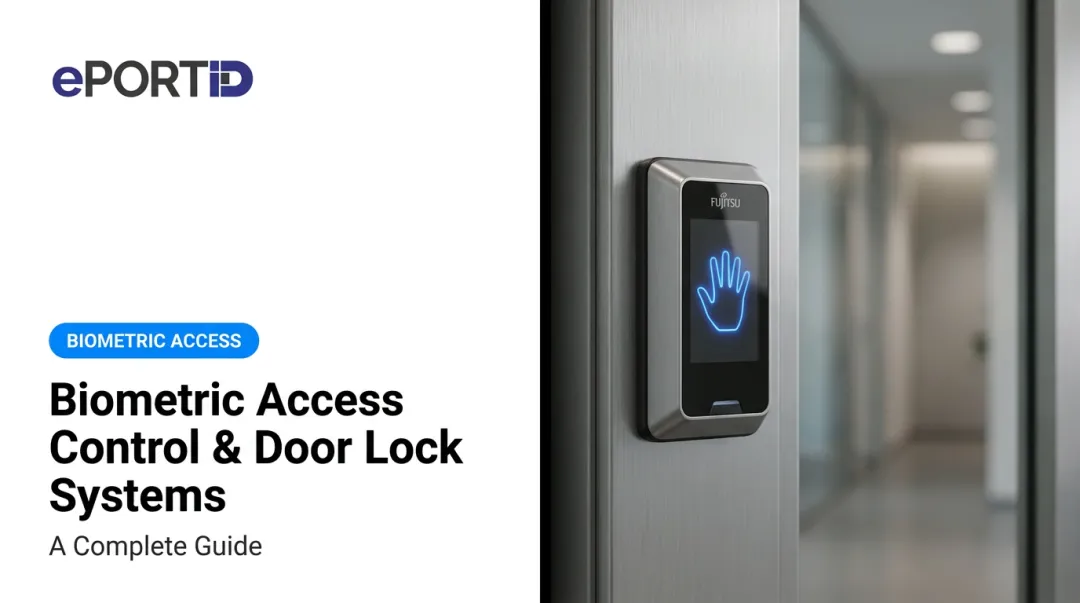
Biometric access control verifies identity using an individual's unique physiological characteristics rather than something they carry. The main modalities include fingerprint scanning, facial recognition, iris scanning, and palm vein scanning.
Palm vein scanning (an advanced contactless option now deployed across critical infrastructure worldwide) reads vein patterns beneath the skin using near-infrared light. This makes it hygienic, non-intrusive, and nearly impossible to spoof since the authentication credential exists beneath the skin surface.
The Critical Security Advantage
Biometrics cannot be lost, forgotten, shared, or duplicated. The credential is always present and always unique to the authorized individual, eliminating proxy access (one employee badging in for another, commonly known as buddy punching).
Advanced biometric systems include liveness detection — they check for living tissue during verification, rejecting spoofing attempts using photos, silicone replicas, or other artificial means.
Data Privacy Consideration
Biometric data is classified as sensitive personal information under regulations like GDPR and BIPA. Organizations must ensure biometric templates are encrypted, stored securely, and governed by clear data retention policies. Proper implementation — encryption, access controls, and defined retention schedules — satisfies these requirements without compromising the security benefits.
Biometrics are the preferred or required choice for:
- Data centers and server rooms
- Military bases and government facilities
- Seaports and airports
- Refineries and power stations
- Research laboratories
- Financial institutions
- Healthcare facilities
In each of these environments, the cost of a single unauthorized access event — operational, legal, or reputational — far exceeds the cost of deploying biometric controls.
The ROI Case Beyond Security
Biometric systems deliver measurable financial returns by eliminating buddy punching and time theft. Research shows that buddy punching costs organizations an average of 2.2% of gross payroll — for a company with a $5 million annual payroll, that's $110,000 in direct losses annually. Industry data indicates that 74% of U.S. businesses experience payroll losses from time theft, with employees admitting to clocking in for absent coworkers in significant numbers.
By creating indisputable records of time and attendance, biometric systems reduce payroll disputes by 27% while eliminating administrative overhead associated with investigating and resolving these issues.
Keycard vs. Biometric Access Control: Which One Is Better?
There is no universal "better" option — the right system depends on your security requirements, operational environment, compliance obligations, and workforce profile.
Security-First Environments
For facilities where a breach could result in loss of life, theft of sensitive data, regulatory penalties, or physical damage, biometrics are the stronger choice. The inability to share, clone, or steal a biometric credential eliminates the most common attack vectors against keycard-based systems.
Cost and Scalability Considerations
Keycards have lower entry costs and scale easily for large, distributed workforces. When you factor in ongoing card replacement, administrative overhead, and the cost of security incidents, biometric systems often deliver better value over 3-5 years.
The numbers make this concrete:
- Buddy punching costs the average employer 2.2% of annual payroll
- A 100-employee organization on a $3 million payroll loses roughly $66,000 per year
- Most biometric deployments recover that cost within six months

Operational Environment Fit
In environments with gloves, heavy machinery, or challenging lighting — factories, oil rigs, ports — not all biometric modalities perform equally:
- Fingerprint readers fail with dirty, wet, or gloved hands
- Facial recognition struggles in variable lighting conditions
- Contactless palm vein scanning reads subsurface vein patterns regardless of surface contamination, gloves, or ambient light
For industrial and infrastructure settings, contactless biometrics that work through gloves and resist environmental interference are the stronger choice.
Situational Recommendation Summary
Choose keycards if:
- Your priority is low-cost, fast deployment for general-access areas
- Security needs are moderate
- Workforce turnover is high but security risks are low
Choose biometrics if:
- You operate a high-security facility
- You have compliance obligations requiring audit-grade identity records
- You need to eliminate identity fraud and buddy punching
- You require indisputable records of every access event
- Your environment involves protective equipment, harsh conditions, or variable lighting
Real-World Examples and Case Studies
With 20 years of experience delivering access control solutions for the US Navy, Army Joint Task Forces, Marine Corps, and Port Authorities, ePortID's deployments illustrate what biometric access control looks like at the highest security tiers — where the cost of a credentialing failure isn't a lost card, but a compromised facility.
Organizations like South Jersey Port Corp., Tata Steel, Dow Chemical, and Thyssen Krupp face a common challenge: large, shift-based workforces with contractors and rotating personnel. In these environments, keycard systems create chronic risks:
- Tailgating: Following an authorized person through a checkpoint
- Buddy punching: One worker clocking in for another
- Untracked access events: Lost or unreported missing cards enabling unauthorized entry
The shift toward biometrics in these settings was driven by a need for indisputable identity records, regulatory compliance, and measurable payroll savings.
Biometric access control systems in industrial and critical infrastructure settings typically deliver measurable returns within months. Organizations report payroll savings from eliminated time theft, lower administrative overhead from reduced disputes, and improved compliance posture through audit-grade access logs.

One financial institution deployment shows how biometrics extend beyond perimeter security. After integrating ePortID's palm vein system for safety deposit vault access, customers scan their palm and the door unlocks in under two seconds. The result:
- Eliminated wait times at the vault
- Improved customer experience with no staff intervention required
- Maintained verifiable audit trails for compliance reporting
These outcomes — faster throughput, reduced overhead, and defensible access records — reflect what biometric deployments consistently deliver across regulated environments.
For high-traffic or high-stakes environments, upfront cost is rarely the deciding factor — it's the operational and compliance cost of getting identity verification wrong.
Conclusion
Keycards remain a practical, cost-effective option for general-purpose access in lower-risk environments. Biometrics — especially contactless solutions that check for liveness and provide audit-grade identity records — are the right choice when the cost of unauthorized access is high and compliance demands are real.
For facilities where identity certainty matters — regulated environments, critical infrastructure, anywhere a breach carries real consequences — the ROI of biometrics extends well beyond the security team's budget. Eliminated payroll fraud, lower administrative overhead, and prevented incidents compound quickly.
Most organizations that make the switch find that contactless biometric access control pays for itself within 3 to 6 months. After that, the savings are recurring and the risk exposure is structurally lower.
Frequently Asked Questions
What are the 4 types of access control?
The four main access control models are Discretionary Access Control (DAC), Mandatory Access Control (MAC), Role-Based Access Control (RBAC), and Attribute-Based Access Control (ABAC). Keycard and biometric systems are credential methods used within these frameworks to verify identity before granting access.
Are passkeys the same as biometrics?
No. Passkeys are cryptographic authentication credentials typically tied to a device and used for digital logins. Biometrics use physical traits (fingerprints, facial features, palm veins) for identity verification. They can work together in multi-factor authentication but are fundamentally different technologies.
Can biometric access control systems be spoofed or hacked?
Older modalities like basic fingerprint and facial recognition have known spoofing vulnerabilities, but advanced systems with liveness detection (such as palm vein scanning) are far more resistant. These systems read sub-surface vein patterns that cannot be replicated from surface impressions or photographs.
What is the most secure type of biometric access control?
Iris scanning and palm vein scanning rank as the most secure modalities. Palm vein scanning, in particular, maps sub-surface vascular patterns across millions of data points — traits that remain stable over time, resist environmental interference, and are effectively impossible to spoof.
How much does biometric access control cost compared to keycard systems?
Biometric systems have higher upfront costs, but the long-term economics often favor them — no card replacement cycles, less administrative overhead, and fewer losses from payroll fraud or unauthorized access. Most organizations reach ROI within 3-6 months once time theft elimination and reduced operational costs are factored in.
Can keycards and biometrics be used together in the same facility?
Yes. Many facilities use keycards for general building entry and biometrics for high-security zones like server rooms or research labs. This tiered approach lets organizations match security levels to access risk without overhauling the entire facility at once.